# ULUSD phone system (GoTo)

### The Olde Standard - tips for getting the most out of your district desk phone

<div class="b-c widget svelte-1b8zbxt" id="bkmrk-let%27s-face-it...-you"><div class="relative block-wrapper"><div class="relative block-box group svelte-1yxjc2k      px-5"><div class="relative w-full rounded block-content svelte-1yxjc2k" data-block-id="bw-2536711753" data-block-type="text.paragraph"><div><div class="text-15" data-field-key="content"><div align="left" class="svelte-kqih7g rich" dir="ltr">Let's face it... your district phone needs some love. It has been doing its thing for years, never asks for attention, and probably won't go away anytime soon. Let's look at some basic and advanced tech tips for our district phone system.</div></div><div class="clear-both">  
</div></div></div></div></div></div><div class="b-c widget svelte-1b8zbxt" id="bkmrk-"><div class="relative block-wrapper"><div class="relative block-box group svelte-1yxjc2k"><div class="relative w-full rounded block-content svelte-1yxjc2k" data-block-id="bw-1751397415" data-block-type="image.single"><span class="relative invisible block anchor -top-14" id="bkmrk--1"></span><div class="relative w-full group"><a class="relative block w-full h-full skip-tracking fancy-pic" data-img-full="https://cdn.smore.com/u/2ee2/6aa878d0a85422159a92694fe64ea58b.jpeg" target="_blank">![](https://cdn.smore.com/u/thumbs/2ee2/thumb-6aa878d0a85422159a92694fe64ea58b.jpeg)</a></div></div></div></div></div><div class="b-c widget svelte-1b8zbxt" id="bkmrk--2"><div class="relative block-wrapper"><div class="relative block-box group svelte-1yxjc2k      px-5"><div class="relative w-full rounded block-content svelte-1yxjc2k" data-block-id="bw-2378213511" data-block-type="text.title" data-toc-text="-----  The BASICS  -----"><span class="relative invisible block anchor -top-14" id="bkmrk--3"></span></div></div></div></div>## <span class="block leading-none translate-hidden ada-text-black text-center    svelte-1dm67oc" dir="ltr"><svg class="inline" height="26.10" viewbox="0 0 48 26.10" width="48" xmlns="http://www.w3.org/2000/svg"><g class="svg-text-group" fill="#e92525"><g transform="translate(0, 21.112000000000002) scale(0.21875)"></g><rect fill="#a10" height="26.10" opacity="0.0" width="48" x="0" y="0"></rect><text fill="transparent" font-family="arial" font-size="26.10" font-weight="bold" height="26.10" lengthadjust="spacingAndGlyphs" opacity="1" textlength="48" x="0" y="21.112000000000002">-----</text></g></svg><svg class="inline" height="26.10" viewbox="0 0 51 26.10" width="51" xmlns="http://www.w3.org/2000/svg"><g class="svg-text-group" fill="#e92525"><g transform="translate(0, 21.112000000000002) scale(0.21875)"></g><rect fill="#a10" height="26.10" opacity="0.0" width="51" x="0" y="0"></rect><text fill="transparent" font-family="arial" font-size="26.10" font-weight="bold" height="26.10" lengthadjust="spacingAndGlyphs" opacity="1" textlength="51" x="0" y="21.112000000000002">The</text></g></svg><svg class="inline" height="26.10" viewbox="0 0 101 26.10" width="101" xmlns="http://www.w3.org/2000/svg"><g class="svg-text-group" fill="#e92525"><g transform="translate(0, 21.112000000000002) scale(0.21875)"></g><rect fill="#a10" height="26.10" opacity="0.0" width="101" x="0" y="0"></rect><text fill="transparent" font-family="arial" font-size="26.10" font-weight="bold" height="26.10" lengthadjust="spacingAndGlyphs" opacity="1" textlength="101" x="0" y="21.112000000000002">BASICS</text></g></svg><svg class="inline" height="26.10" viewbox="0 0 36 26.10" width="36" xmlns="http://www.w3.org/2000/svg"><g class="svg-text-group" fill="#e92525"><g transform="translate(0, 21.112000000000002) scale(0.21875)"></g><rect fill="#a10" height="26.10" opacity="0.0" width="36" x="0" y="0"></rect><text fill="transparent" font-family="arial" font-size="26.10" font-weight="bold" height="26.10" lengthadjust="spacingAndGlyphs" opacity="1" textlength="36" x="0" y="21.112000000000002">-----</text></g></svg></span>Phone handset -- quick reference guides

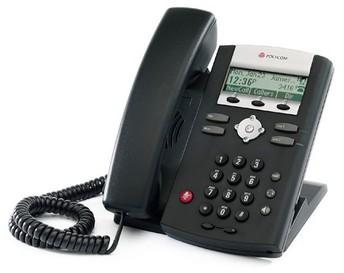
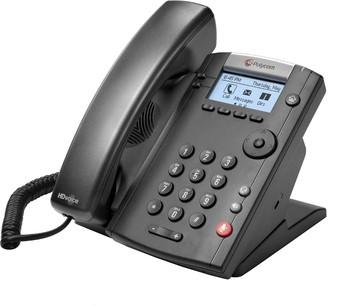
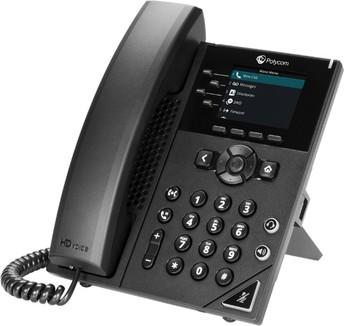
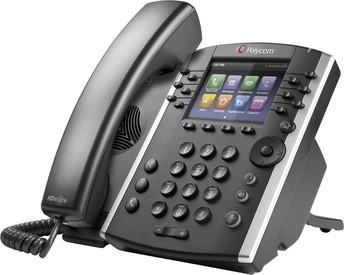
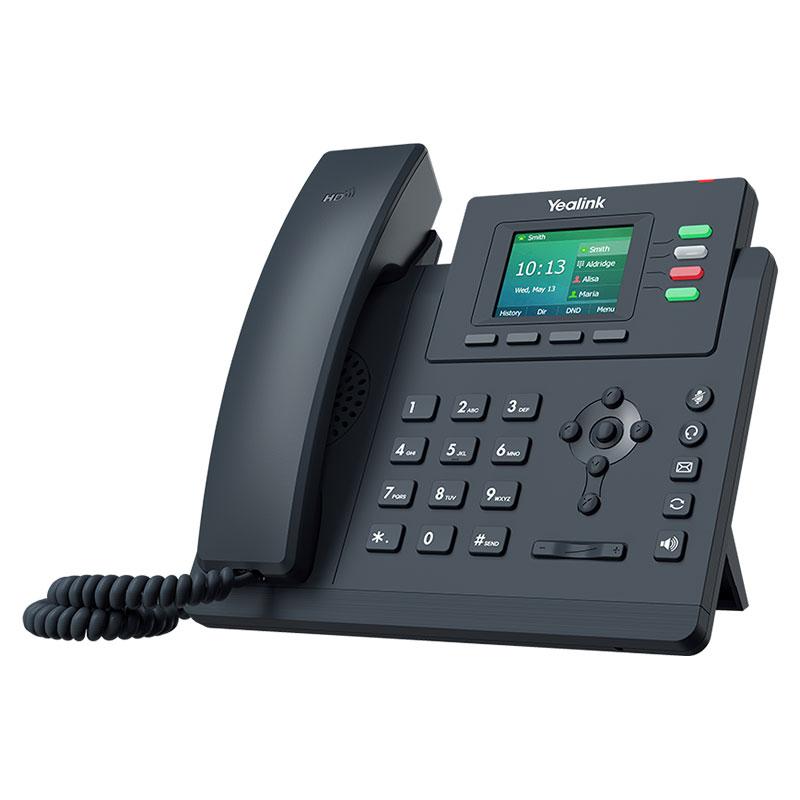
<div class="b-c widget svelte-1b8zbxt" id="bkmrk-depending-on-the-pho"><div class="relative block-wrapper"><div class="relative block-box group svelte-1yxjc2k      px-5"><div class="relative w-full rounded block-content svelte-1yxjc2k" data-block-id="bw-8189880177" data-block-type="text.paragraph"><div class="text-15" data-field-key="content"><div align="left" class="svelte-kqih7g rich" dir="ltr">Depending on the phone you're using, there's a different way to make calls, check voicemail, and change the ringer. Take a look at the **quick reference guide** for your phone. Since we have several different phone models, you'll have to find yours by comparing to the pictures below:</div><div align="left" class="svelte-kqih7g rich" dir="ltr">  
</div></div><div class="clear-both"><table border="1" style="border-collapse: collapse; width: 100%;"><colgroup><col style="width: 50%;"></col><col style="width: 50%;"></col></colgroup><tbody><tr><td>[Polycom SoundPoint 331 quick reference guide](https://bookstack.ulusd.org/attachments/8)</td><td>[![thumb-fc7c382c96f8a0adc920e295a3a3df54.jpeg](https://bookstack.ulusd.org/uploads/images/gallery/2025-08/scaled-1680-/w8CtiltGUNMwn0hJ-thumb-fc7c382c96f8a0adc920e295a3a3df54.jpeg)](https://bookstack.ulusd.org/uploads/images/gallery/2025-08/w8CtiltGUNMwn0hJ-thumb-fc7c382c96f8a0adc920e295a3a3df54.jpeg)</td></tr><tr><td>[Polycom VVX 201 quick reference guide](https://bookstack.ulusd.org/attachments/7)</td><td>[![thumb-33fc8a93f66921186a86a94a358bbe83.jpeg](https://bookstack.ulusd.org/uploads/images/gallery/2025-08/scaled-1680-/lHJYbsaTeEAlG0xW-thumb-33fc8a93f66921186a86a94a358bbe83.jpeg)](https://bookstack.ulusd.org/uploads/images/gallery/2025-08/lHJYbsaTeEAlG0xW-thumb-33fc8a93f66921186a86a94a358bbe83.jpeg)</td></tr><tr><td>[Polycom VVX 150 or VVX 250 quick reference guide](https://bookstack.ulusd.org/attachments/6)</td><td>[![thumb-20bde466e604edf34a617373bbb8c829.jpeg](https://bookstack.ulusd.org/uploads/images/gallery/2025-08/scaled-1680-/Ipcc25ZdjJRcEko6-thumb-20bde466e604edf34a617373bbb8c829.jpeg)](https://bookstack.ulusd.org/uploads/images/gallery/2025-08/Ipcc25ZdjJRcEko6-thumb-20bde466e604edf34a617373bbb8c829.jpeg)</td></tr><tr><td>[Polycom VVX 400 quick reference guide](https://bookstack.ulusd.org/attachments/9)</td><td>[![thumb-a66b4808fda24ce25ed353175fecf9fb.jpeg](https://bookstack.ulusd.org/uploads/images/gallery/2025-08/scaled-1680-/UvKV7NbpKVUVcViE-thumb-a66b4808fda24ce25ed353175fecf9fb.jpeg)](https://bookstack.ulusd.org/uploads/images/gallery/2025-08/UvKV7NbpKVUVcViE-thumb-a66b4808fda24ce25ed353175fecf9fb.jpeg)</td></tr><tr><td>[Yealink T33G Quick Reference Guide.pdf](https://bookstack.ulusd.org/attachments/10)</td><td>[![SIP-T33G-800x800.jpg](https://bookstack.ulusd.org/uploads/images/gallery/2025-08/scaled-1680-/rF4Zx3JISNIUU9bx-sip-t33g-800x800.jpg)](https://bookstack.ulusd.org/uploads/images/gallery/2025-08/rF4Zx3JISNIUU9bx-sip-t33g-800x800.jpg)</td></tr></tbody></table>

</div></div></div></div></div><div class="b-c widget svelte-1b8zbxt" id="bkmrk-polycom_soundpoint_i"><div class="relative block-wrapper"><div class="relative block-box group svelte-1yxjc2k      px-5"><div class="relative w-full rounded block-content svelte-1yxjc2k" data-block-id="bw-2961467216" data-block-type="text.paragraph"><span class="relative invisible block anchor -top-14" id="bkmrk--6"></span><div><div class="text-15" data-field-key="content">  
</div></div></div></div></div></div><div class="b-c widget svelte-1b8zbxt" id="bkmrk-quick-reference-guid"><div class="relative block-wrapper"><div class="relative block-box group svelte-1yxjc2k      px-5"><div class="relative w-full rounded block-content svelte-1yxjc2k" data-block-id="bw-0305574161" data-block-type="text.paragraph"><span class="relative invisible block anchor -top-14" id="bkmrk--7"></span><div>  
</div></div></div></div></div><div class="b-c widget svelte-1b8zbxt" id="bkmrk--12"><div class="relative block-wrapper"><div class="relative block-box group svelte-1yxjc2k      px-5"><div class="relative w-full rounded block-content svelte-1yxjc2k" data-block-id="bw-6999995656" data-block-type="text.paragraph"><div>  
</div></div></div></div></div>### Skip the voicemail!

<div class="b-c widget svelte-1b8zbxt" id="bkmrk-i-hate-checking-voic"><div class="relative block-wrapper"><div class="relative block-box group svelte-1yxjc2k      px-5"><div class="relative w-full rounded block-content svelte-1yxjc2k" data-block-id="bw-6999995656" data-block-type="text.paragraph"><div><div class="text-15" data-field-key="content"><div align="left" class="svelte-kqih7g rich" dir="ltr">I hate checking voicemail on my phone. I know I'm not alone. Want your voicemail to skip the phone, and send you an email directly? That way you can listen to the voicemail in your email application without ever having to log in to your phone.</div></div></div></div></div></div></div>To do this, you will need to log into your personal GoTo portal ([https://app.goto.com/](https://app.goto.com/)). GoTo is the name of our phone system (previously GoToConnect, previously LogMeIn, previously Jive, previously...)

If you have never previously logged into this site, you will need to use the "forgot password" link to generate a new password. Use your district email address.

<div class="b-c widget svelte-1b8zbxt" id="bkmrk-after-logging-into-t"><div class="relative block-wrapper"><div class="relative block-box group svelte-1yxjc2k      px-5"><div class="relative w-full rounded block-content svelte-1yxjc2k" data-block-id="bw-7804343244" data-block-type="text.paragraph"><span class="relative invisible block anchor -top-14" id="bkmrk--16"></span><div><div class="text-15" data-field-key="content"><div align="left" class="svelte-kqih7g rich" dir="ltr">After logging into the GoTo site, you'll find the Voicemail settings by clicking on your profile button in the top right. You can access the voicemail settings under "Voice", then "Voicemail." Here is a screenshot of the settings required to send voicemail directly to your email, bypassing your district phone.</div></div><div class="clear-both">  
</div></div></div></div></div></div><div class="b-c widget svelte-1b8zbxt" id="bkmrk--17"><div class="relative block-wrapper"><div class="relative block-box group svelte-1yxjc2k      px-5"><div class="relative w-full rounded block-content svelte-1yxjc2k" data-block-id="bw-5219652747" data-block-type="text.paragraph"><span class="relative invisible block anchor -top-14" id="bkmrk--18"></span><div>  
</div></div></div></div></div>### Yes, there is an app for that

<div class="b-c widget svelte-1b8zbxt" id="bkmrk-this-last-tip-is-not"><div class="relative block-wrapper"><div class="relative block-box group svelte-1yxjc2k      px-5"><div class="relative w-full rounded block-content svelte-1yxjc2k" data-block-id="bw-5219652747" data-block-type="text.paragraph"><div><div class="text-15" data-field-key="content"><div align="left" class="svelte-kqih7g rich" dir="ltr">  
</div><div align="left" class="svelte-kqih7g rich" dir="ltr"><table border="1" style="border-collapse: collapse; width: 100%; border-width: 1px; border-color: rgb(255, 255, 255);"><colgroup><col style="width: 63.3849%;"></col><col style="width: 36.7105%;"></col></colgroup><tbody><tr><td style="border-color: rgb(255, 255, 255);"><div class="b-c widget svelte-1b8zbxt" id="bkmrk-this-last-tip-is-not-1"><div class="relative block-wrapper"><div class="relative block-box group svelte-1yxjc2k      px-5"><div class="relative w-full rounded block-content svelte-1yxjc2k" data-block-id="bw-5219652747" data-block-type="text.paragraph"><div><div class="text-15" data-field-key="content"><div align="left" class="svelte-kqih7g rich" dir="ltr">**This last tip is not for everyone, since it involves using your personal phone.** IF YOU DO NOT WISH TO TRY THIS TIP, FEEL FREE TO SKIP.</div></div></div></div></div></div></div>You can download the GoTo mobile app to your personal cell phone (or district supplied, where appropriate).

[iOS](https://apps.apple.com/us/app/goto/id1465614785)

[Android](https://play.google.com/store/apps/details?id=com.logmein.gotoconnect&hl=en_US&gl=US)

</td><td style="border-color: rgb(255, 255, 255);">[![thumb-07027e7d5f6b0906e385ed0b7fbc9d36.jpeg](https://bookstack.ulusd.org/uploads/images/gallery/2025-08/scaled-1680-/8EmyptumYHO1raCD-thumb-07027e7d5f6b0906e385ed0b7fbc9d36.jpeg)](https://bookstack.ulusd.org/uploads/images/gallery/2025-08/8EmyptumYHO1raCD-thumb-07027e7d5f6b0906e385ed0b7fbc9d36.jpeg)</td></tr></tbody></table>

</div></div></div></div></div></div></div>Once downloaded, the login process is the same as mentioned in the previous tip. Here are some of the features that can be accessed:

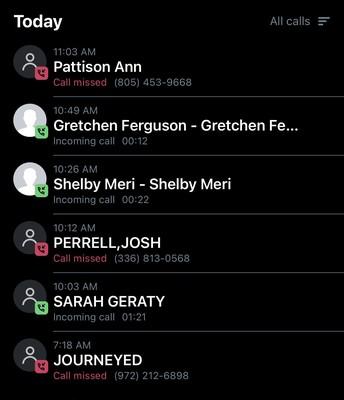
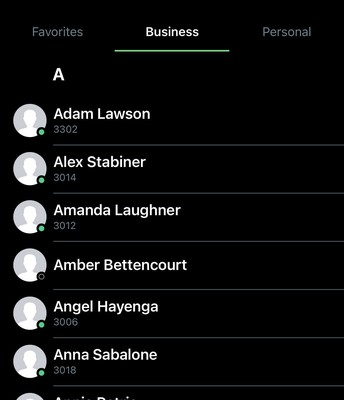
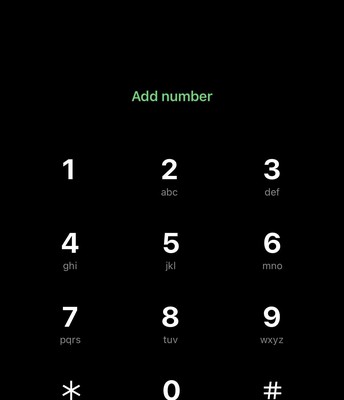
<div class="b-c widget svelte-1b8zbxt" id="bkmrk--22"><div class="relative block-wrapper"><div class="relative block-box group svelte-1yxjc2k      px-5"><div class="relative w-full rounded block-content svelte-1yxjc2k" data-block-id="bw-3380883307" data-block-type="items"><span class="relative invisible block anchor -top-14" id="bkmrk--23"></span><div class="grid grid-cols-2 gap-x-4 md:grid-cols-3 print:grid-cols-3"><table border="1" style="border-collapse: collapse; width: 100%; border-width: 1px; border-style: hidden;"><colgroup><col style="width: 32.1746%;"></col><col style="width: 35.7472%;"></col><col style="width: 32.1735%;"></col></colgroup><tbody><tr><td class="align-center">[![thumb-08ddc287797583360bf9f15d2bbe3cf3.jpeg](https://bookstack.ulusd.org/uploads/images/gallery/2025-08/scaled-1680-/juiXgFffeOqDw8oL-thumb-08ddc287797583360bf9f15d2bbe3cf3.jpeg)](https://bookstack.ulusd.org/uploads/images/gallery/2025-08/juiXgFffeOqDw8oL-thumb-08ddc287797583360bf9f15d2bbe3cf3.jpeg)

#### **Recent call history**

<div class="text-15" data-field-key="content-0"><div align="left" class="svelte-kqih7g rich" dir="ltr">Quickly review recent missed and answered calls</div></div></td><td>[![thumb-2d14634b4d0204dee58fc23faceb1b22.jpeg](https://bookstack.ulusd.org/uploads/images/gallery/2025-08/R7k5SXgd1F1rFSap-thumb-2d14634b4d0204dee58fc23faceb1b22.jpeg)](https://bookstack.ulusd.org/uploads/images/gallery/2025-08/juiXgFffeOqDw8oL-thumb-08ddc287797583360bf9f15d2bbe3cf3.jpeg)

#### **District phone extensions**

<div class="text-15" data-field-key="content-1"><div align="left" class="svelte-kqih7g rich" dir="ltr">No more forgetting that 4 digit extension!</div></div></td><td>[![thumb-62d2e2ba4a588be80c5b23ac44c6ad2d.jpeg](https://bookstack.ulusd.org/uploads/images/gallery/2025-08/Ey7lYUUUpBgLVUMl-thumb-62d2e2ba4a588be80c5b23ac44c6ad2d.jpeg)](https://bookstack.ulusd.org/uploads/images/gallery/2025-08/juiXgFffeOqDw8oL-thumb-08ddc287797583360bf9f15d2bbe3cf3.jpeg)

#### **Make a call**

<div class="text-15" data-field-key="content-2"><div align="left" class="svelte-kqih7g rich" dir="ltr">Any call made through the app is routed through the school district, meaning the caller ID should show "Upper Lake Unified School District"</div></div></td></tr></tbody></table>

</div></div></div></div></div><div class="grid grid-cols-2 gap-x-4 md:grid-cols-3 print:grid-cols-3" id="bkmrk--8"></div>