ULUSD phone system (GoTo)

The Olde Standard - tips for getting the most out of your district desk phone

Let's face it... your district phone needs some love. It has been doing its thing for years, never asks for attention, and probably won't go away anytime soon. Not exactly something to romanticize, but this week is its time to shine! Let's look at some basic and advanced tech tips for our district phone system.

-----TheBASICS-----


Phone handset -- quick reference guides

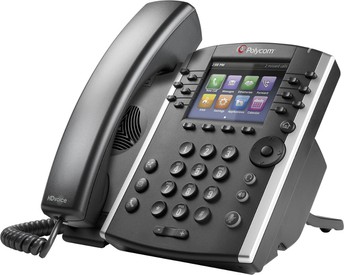
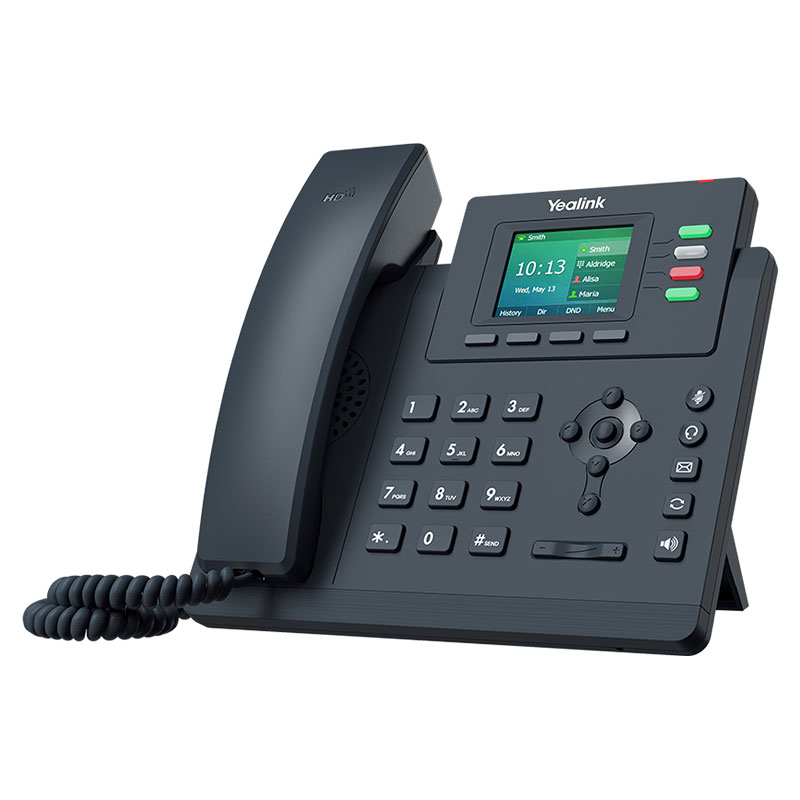
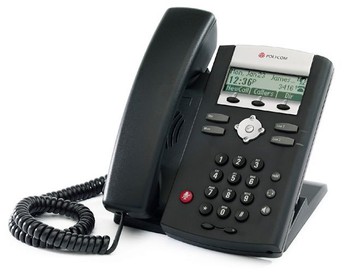
Depending on the phone you're using, there's a different way to make calls, check voicemail, and change the ringer. Take a look at the quick reference guide for your phone. Since we have several different phone models, you'll have to find yours by comparing to the pictures below:
-----FortheADVANCED------


Skip the voicemail!

I hate checking voicemail on my phone. I know I'm not alone. Want your voicemail to skip the phone, and send you an email directly? That way you can listen to the voicemail in your email application without ever having to log in to your phone.


To do this, you will need to log into your personal GoTo portal (https://app.goto.com/). GoTo is the name of our phone system (previously GoToConnect, previously LogMeIn, previously Jive, previously...)


If you have never previously logged into this site, you will need to use the "forgot password" link to generate a new password. Use your district email address.

After logging into the GoTo site, you'll find the Voicemail settings by clicking on your profile button in the top right. You can access the voicemail settings under "Voice", then "Voicemail." Here is a screenshot of the settings required to send voicemail directly to your email, bypassing your district phone.


Yes, there is an app for that


This last tip is not for everyone, since it involves using your personal phone. IF YOU DO NOT WISH TO TRY THIS TIP, FEEL FREE TO SKIP.


You can download the GoTo mobile app to your personal cell phone (or district supplied, where appropriate).


iOS

Android


thumb-07027e7d5f6b0906e385ed0b7fbc9d36.jpeg

Once downloaded, the login process is the same as mentioned in the previous tip. Here are some of the features that can be accessed:

thumb-08ddc287797583360bf9f15d2bbe3cf3.jpeg

Recent call history

Quickly review recent missed and answered calls

thumb-2d14634b4d0204dee58fc23faceb1b22.jpeg

District phone extensions

No more forgetting that 4 digit extension!

thumb-62d2e2ba4a588be80c5b23ac44c6ad2d.jpeg

Make a call

Any call made through the app is routed through the school district, meaning the caller ID should show "Upper Lake Unified School District"

Recent call history

District phone extensions

Make a call