
Welcome to the ULUSD Helpdesk! (Instructions)
The ULUSD IT Helpdesk keeps track of all of your IT requests. This website allows you to submit new IT requests, review older requests, and view solutions to common issues.
There are 23 ways to submit an IT request:
>>Method #1<<#1: To submit a new IT request via email, simply send an email to support@ulusd.org. Remember to include the problem description and anything else needed to resolve the issue!
>>Method #2<< Log into the ULUSD IT Helpdesk with your ULUSD Google account. To access the website, click HERE. Click the "Login" button, and choose the Google button to sign in with your ULUSD Google account. Once signed in, click "New Support Ticket". You can also view your previously submitted tickets, and review solutions to common problems.
Method #2: Download the iOS or Android ULUSD IT Helpdesk app for your mobile phone
Method #3: To submit a new IT request via email, simply send an email to support@ulusd.org. Remember to include the problem description and anything else needed to resolve the issue!
Step by step instructions for using the IT Helpdesk on a laptop:
Step 1) Log in using your Google sign in

Step 2) Submit your IT help request using one of the forms
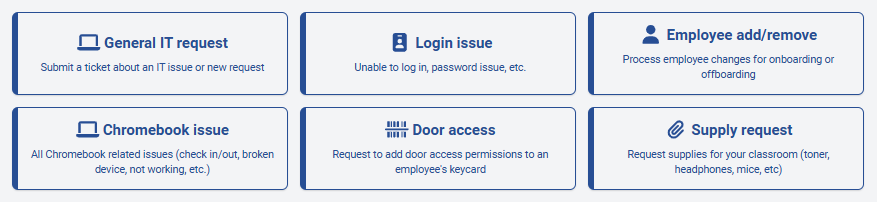
Step 3) Be sure to include as much information as possible, including a good time for follow-up if you are not immediately available.
Contact Blaze King if you have any problems signing in or submitting new IT requests:
bking@ulusd.org
707-275-9139