Tech Tip Tuesday (October 14, 2025)

Screenshot 2025-10-06 082403.png

October is National Cyber Security Awareness Month


Passwords? That's so last year. No, let's try a passphrase.
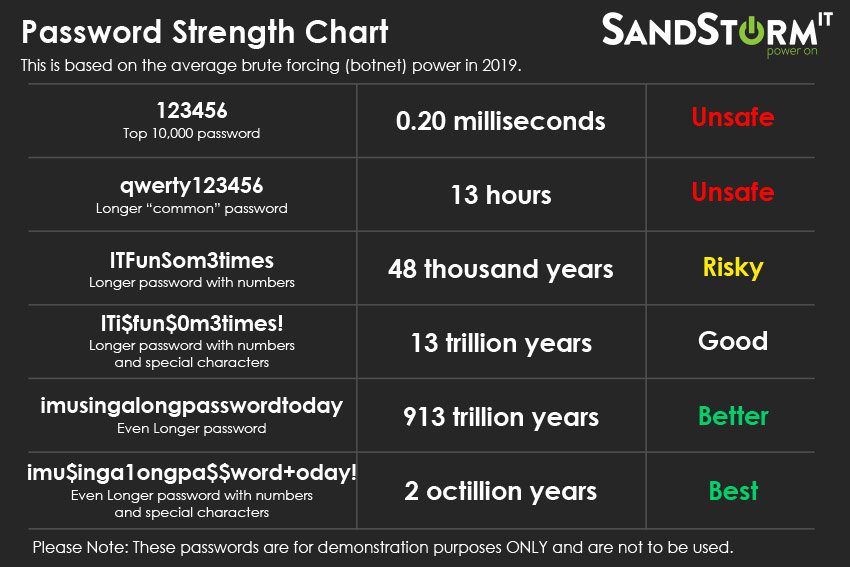


A strong password doesn’t have to be hard to remember — it just needs to be long and unique. Combine a few random words to create something easy to recall but nearly impossible to guess, like:


--> cactus-rainbow-ocean 

--> library-taco-galaxy


Avoid personal info, and don’t reuse passwords across accounts.


Tip: The longer the phrase, the stronger the protection.

Check out Google's Password Tips

image.png


image.png

END OF THE PASSWORD


A passkey is a secure, passwordless way to sign in to Google.


Instead of typing a password, you use something you already have — like your phone, fingerprint, or device PIN — to prove it’s really you.


Passkeys protect against phishing and make sign-ins faster.
You can set one up in your Google Account settings:


Create a Passkey for Google


image.png

thumb-a49d786c3702b02af052f7f4feecf8e2.png

Blaze King

Director of Information Technology

Email: bking@ulusd.org
Website: ulusd.org
Location: 750 Old Lucerne Road, Upper Lake, CA, USA
Phone: 707-275-9139